---
title: How to update or add a new tax
description: VAT tax has changed according to the law and you want to update it? Do you have a new tax to add to the system? This tutorial will show you how to change it in the software in a few easy steps. If you
---
[Skip to content](https://support.bmileisure.com/support-center/how-to-update-or-add-a-new-tax#main-content)
English
Show submenu for translations
[Customer portal](https://support.bmileisure.com/tickets-view?hsLang=en)
![logo\_big\_darkBG@2x.png\]](https://support.bmileisure.com/hs-fs/hubfs/logo_big_darkBG@2x.png?height=50&name=logo_big_darkBG@2x.png)
Open main navigation
Close main navigation
- English
Show submenu for translations
- [Customer portal](https://support.bmileisure.com/tickets-view)
- [Main website](https://www.bmileisure.com/en/)
[Main website](https://www.bmileisure.com/en/)
Welcome to the BMI Support Portal. How can we help you?
- There are no suggestions because the search field is empty.
1. [Support Center](https://support.bmileisure.com/support-center?hsLang=en)
2. [Streamlined Operations](https://support.bmileisure.com/support-center/streamlined-operations?hsLang=en)
3. [Point of Sales](https://support.bmileisure.com/support-center/streamlined-operations?hsLang=en#point-of-sales)
# How to update or add a new tax
### Introduction
VAT tax has changed according to the law and you want to update it? Do you have a new tax to add to the system? This tutorial will show you how to change it in the software in a few easy steps.
### Create a new TAX
- Step 1 : Go into your software, open the menu and go to Products –\> Configuration -\> Taxes.
- Click on the ‘+’ icon, the tax configuration window will open. We will need to give the tax a ‘Name’ and ‘Percentage’.
- Give the tax a name, for this example we will go with ‘21%’.
- Configure the correct tax percentage in the field next to ‘Name’.
- Confirm with ‘Save’.
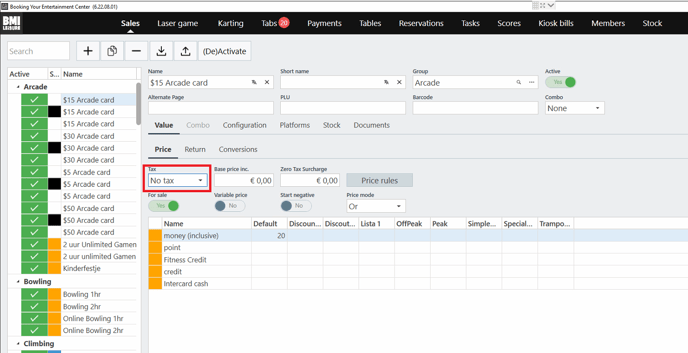
If you need to add this tax to a specific product, you can look for that product from Menu - Products and edit the 'Tax' field.
### Update an existing TAX
If one of the existing tax has been updated with a different percentage, and you need to update it, you don't need to create a new tax, but you just edit an existing one. Please follow the steps:
- Step 1 : Go into your software, open the menu and go to Products –\> Configuration -\> Taxes.
- Step 2 : Find the current tax rate and double click on it.
- Step 3 Change the tax rate in percentages and preferably also in the name so that it’s clear that it’s changed.
- Step 4 : Click ‘Apply’.
You don't need to change anything on the product since the tax is already configured there and it will be updated automatically. All future transactions will be calculated based on the new VAT tax. Please note that the tax may not be changed on payments already made.
- [Guest Activation](https://support.bmileisure.com/support-center/guest-activation?hsLang=en#main-content)
- [Online Booking](https://support.bmileisure.com/support-center/guest-activation?hsLang=en#online-booking)
- [Registration kiosk](https://support.bmileisure.com/support-center/guest-activation?hsLang=en#registration-kiosk)
- [Group booking](https://support.bmileisure.com/support-center/guest-activation?hsLang=en#group-booking)
- [Event booking (B2B)](https://support.bmileisure.com/support-center/guest-activation?hsLang=en#event-booking-b2b)
- [Offers and reservations](https://support.bmileisure.com/support-center/guest-activation?hsLang=en#offers-and-reservations)
- [Combo deals](https://support.bmileisure.com/support-center/guest-activation?hsLang=en#combo-deals)
- [Guest Engagement & Retention](https://support.bmileisure.com/support-center/guest-engagement-retention?hsLang=en#main-content)
- [CRM](https://support.bmileisure.com/support-center/guest-engagement-retention?hsLang=en#crm)
- [Email marketing](https://support.bmileisure.com/support-center/guest-engagement-retention?hsLang=en#email-marketing)
- [Mobile app](https://support.bmileisure.com/support-center/guest-engagement-retention?hsLang=en#mobile-app)
- [Mobile push notification](https://support.bmileisure.com/support-center/guest-engagement-retention?hsLang=en#mobile-push-notification)
- [Memberships & subscriptions](https://support.bmileisure.com/support-center/guest-engagement-retention?hsLang=en#memberships-subscriptions)
- [Loyalty system](https://support.bmileisure.com/support-center/guest-engagement-retention?hsLang=en#loyalty-system)
- [Promotions & discounts](https://support.bmileisure.com/support-center/guest-engagement-retention?hsLang=en#promotions-discounts)
- [Cross and upsell](https://support.bmileisure.com/support-center/guest-engagement-retention?hsLang=en#cross-and-upsell)
- [Video marketing (TV) & digital signage](https://support.bmileisure.com/support-center/guest-engagement-retention?hsLang=en#video-marketing-tv-digital-signage)
- [Streamlined Operations](https://support.bmileisure.com/support-center/streamlined-operations?hsLang=en#main-content)
- [Point of Sales](https://support.bmileisure.com/support-center/streamlined-operations?hsLang=en#point-of-sales)
- [Ticketing](https://support.bmileisure.com/support-center/streamlined-operations?hsLang=en#ticketing)
- [Offers & invoices](https://support.bmileisure.com/support-center/streamlined-operations?hsLang=en#offers-invoices)
- [Smart scheduling](https://support.bmileisure.com/support-center/streamlined-operations?hsLang=en#smart-scheduling)
- [Staff management](https://support.bmileisure.com/support-center/streamlined-operations?hsLang=en#staff-management)
- [Food & beverage management](https://support.bmileisure.com/support-center/streamlined-operations?hsLang=en#food-beverage-management)
- [Maintenance & spare parts](https://support.bmileisure.com/support-center/streamlined-operations?hsLang=en#maintenance-spare-parts)
- [Timing](https://support.bmileisure.com/support-center/streamlined-operations?hsLang=en#timing)
- [TV Video marketing & digital signage](https://support.bmileisure.com/support-center/streamlined-operations?hsLang=en#tv-video-marketing-digital-signage)
- [Integrations](https://support.bmileisure.com/support-center/integrations?hsLang=en#main-content)
- [Payment processors](https://support.bmileisure.com/support-center/integrations?hsLang=en#payment-processors)
- [Integrated hardware](https://support.bmileisure.com/support-center/integrations?hsLang=en#integrated-hardware)
- [Fiscal integrations](https://support.bmileisure.com/support-center/integrations?hsLang=en#fiscal-integrations)
- [Kitchen Display Systems](https://support.bmileisure.com/support-center/integrations?hsLang=en#kitchen-display-systems)
- [Insights & Reporting](https://support.bmileisure.com/support-center/insights-reporting?hsLang=en#main-content)
- [Easy data access and analysis](https://support.bmileisure.com/support-center/insights-reporting?hsLang=en#easy-data-access-and-analysis)
- [Quick data export](https://support.bmileisure.com/support-center/insights-reporting?hsLang=en#quick-data-export)
- [Microsoft Power Bi](https://support.bmileisure.com/support-center/insights-reporting?hsLang=en#microsoft-power-bi)
- [Troubleshooting](https://support.bmileisure.com/support-center/troubleshooting?hsLang=en#main-content)
- [Hardware](https://support.bmileisure.com/support-center/troubleshooting?hsLang=en#hardware)
- [Timing](https://support.bmileisure.com/support-center/troubleshooting?hsLang=en#timing)
- [Windows OS](https://support.bmileisure.com/support-center/troubleshooting?hsLang=en#windows-os)
- [Manuals](https://support.bmileisure.com/support-center/manuals?hsLang=en)
- [Can’t find the answer to your question?](https://support.bmileisure.com/support-center/cant-find-the-answer-to-your-question?hsLang=en)
- [Product Updates](https://support.bmileisure.com/support-center/product-updates?hsLang=en#main-content)
- [October 2023](https://support.bmileisure.com/support-center/product-updates?hsLang=en#october-2023)
[-1.png?width=37&height=37&name=2-%20Alternative%20logo%20(Black)-1.png "Chill listening crop-3")](https://www.bmileisure.com/en/)
Copyright © 2026, BMI Leisure
```json
{
"@context" : "https://schema.org",
"@type" : "VideoObject",
"contentUrl" : "https://25647964.fs1.hubspotusercontent-eu1.net/hubfs/25647964/Support/tax.mp4",
"dateModified" : "2025-02-03T10:44:06.005Z",
"duration" : "PT28.282S",
"height" : 986,
"name" : "tax",
"thumbnailUrl" : "https://info.bmileisure.com/hubfs/Support/tax.mp4/medium.jpg",
"uploadDate" : "2022-08-02T13:02:33.335Z",
"width" : 1794
}
```